

Ops Forms
0-1 product lead - optimized operator inspection form submission and issue report
My Contribution
Product Lead
Own cross team alignment, user research, and PRD scoping to link business goals with real user needs and technical feasibility for the 0→1 feature
Product Designer
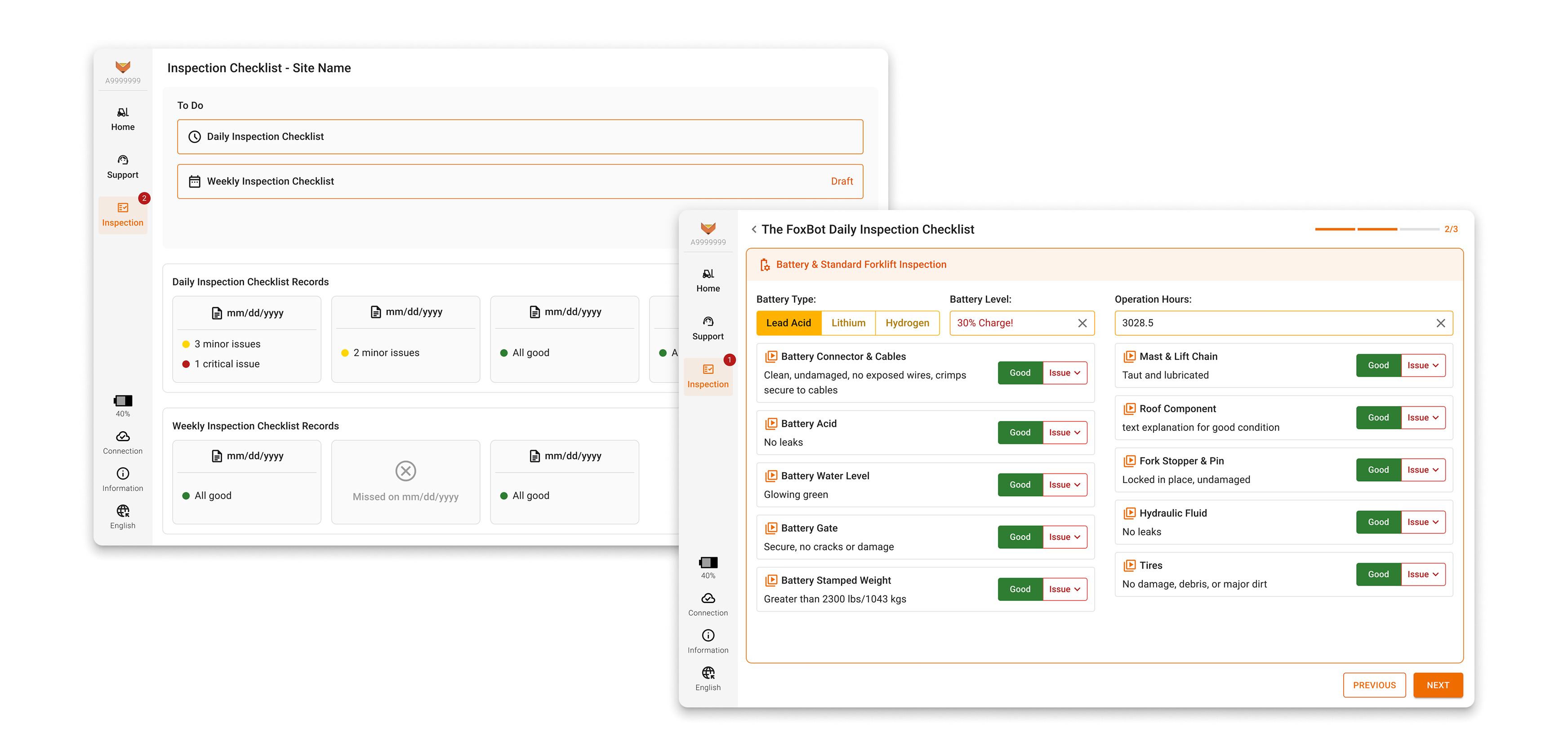
Designed and tested a new tablet feature; delivered mockups with full annotations and product specs to support development
Team & Delivery
3 App Engineers | 3 Deployment Engineers | 5 SMEs
Research Report | PRD | Hi-fi Mockups | Spreadsheet for Dev Schema
Impacts
Exeeded 50% adoption rate and 85% completion rate.

What & Why
Context
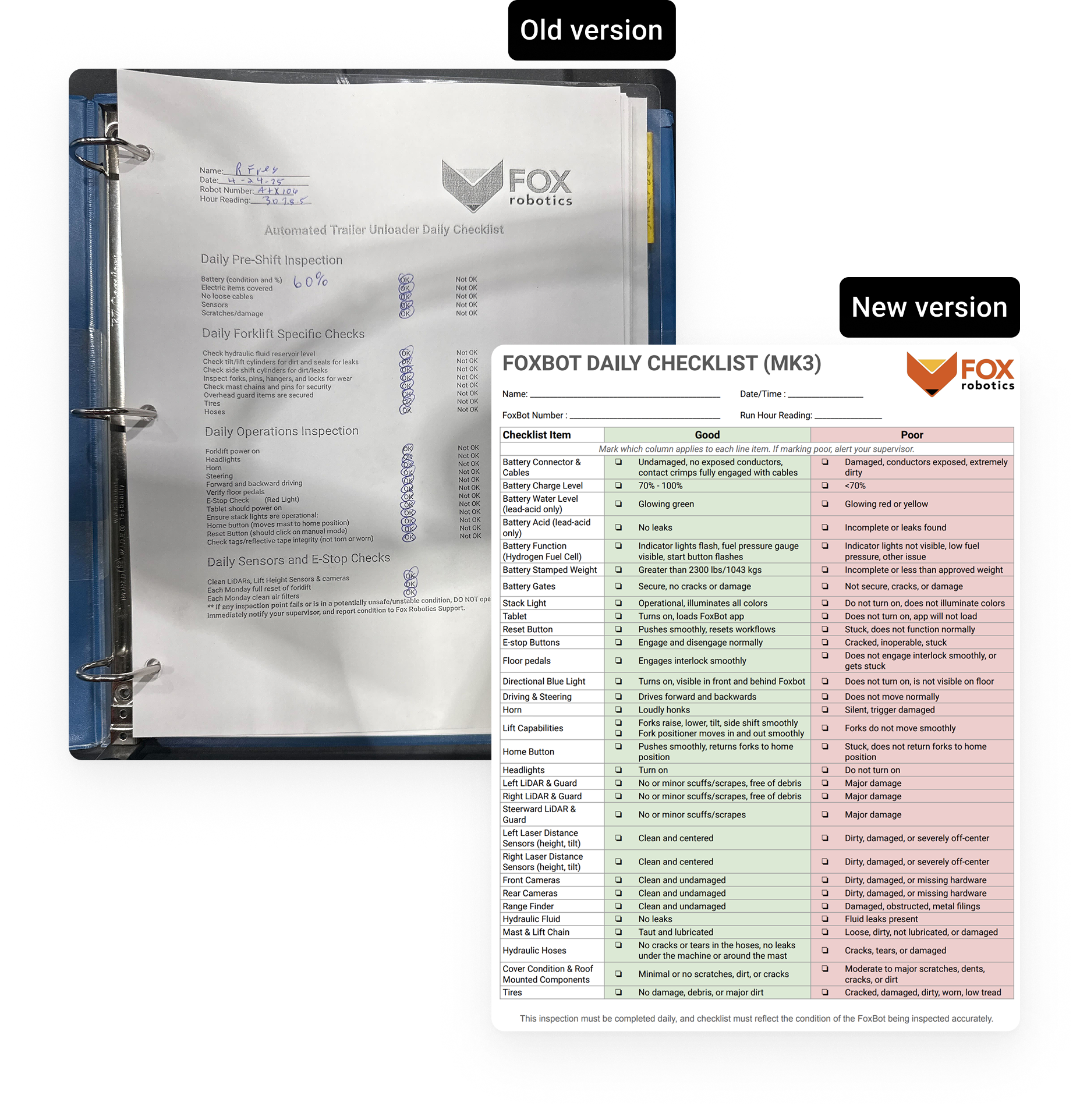
Operators should complete a paper inspection checklist before starting the FoxBot.
Business Pain Points:
- <10% of customers complete checklists
- ~50% of support tickets are due to missed inspections.
- The support team lacks context when issues arise.
Leadership Request:
- Digitize the checklist in the tablet app
- Remind users to complete inspections
- Reduce support tickets from missed checks

Research To Scope Product
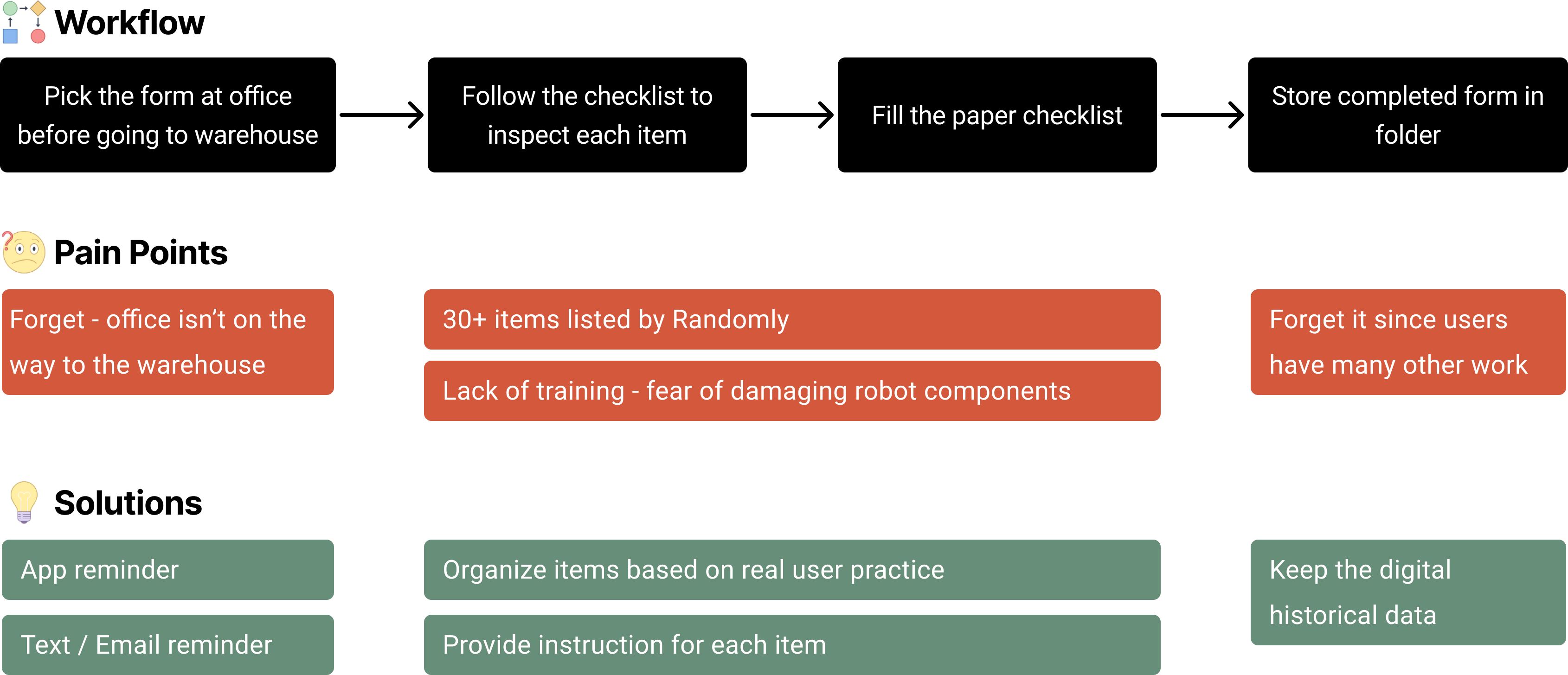
After the PM's departure, I aligned with leadership and cross-functional teams to clarify the problem space. I planned and conducted user research to bridge the gap between the business proposal and real user pain points, ultimately using design to articulate actionable product requirements.
Workflow 1: Form Submission
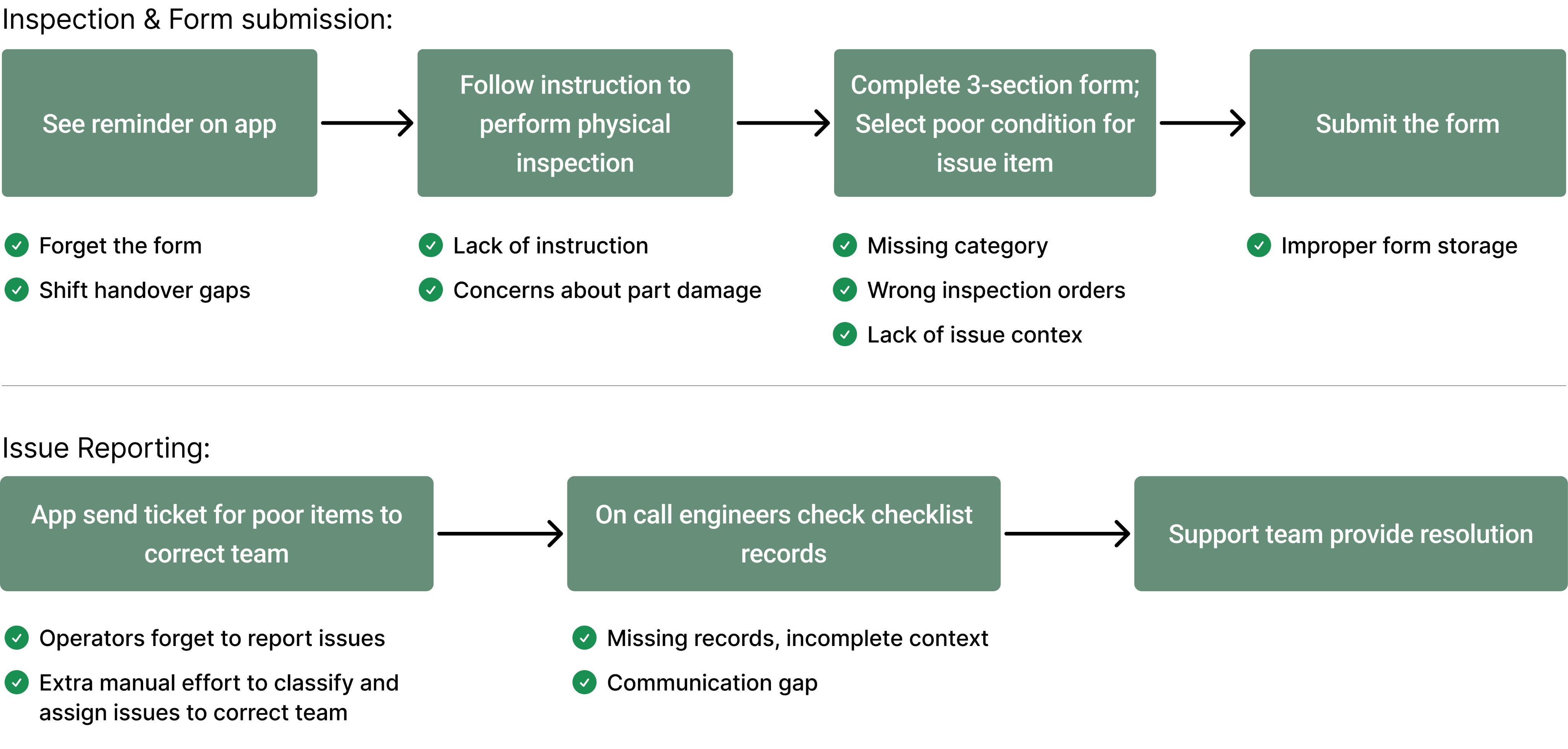
Workflow 2: Issue Reporting

New Workflow
Prioritization & Trade-off
Target Users
Focused on field operators and managers.
Excluding internal users due to service mode API limitations.
Form Review (Data Consuming)
- Customers can review forms directly on the tablet; remote access isn’t supported yet due to missing authentication.
- JSON output for internal use as a temporary solution. Phase 2 will bring the same review experience to the internal web tool for internal users. PDF export is out of scope.
Missing Data
- Battery level and operation hours: manually entered by users in phase 1. (I requested the vehicle team to build an API for future automation.)
- Battery types: no API planned since customers can change types, so users will simply select they type at the begining to load the right form.
Design Principles & Matrix
- User Goal: Provide clear user reminders and quick access to checklist items to boost efficiency. Ensure 50% adoption rate and 85% completion rate.
- Business Goal: Streamline issue reporting and automate customer support workflows, aming to improve
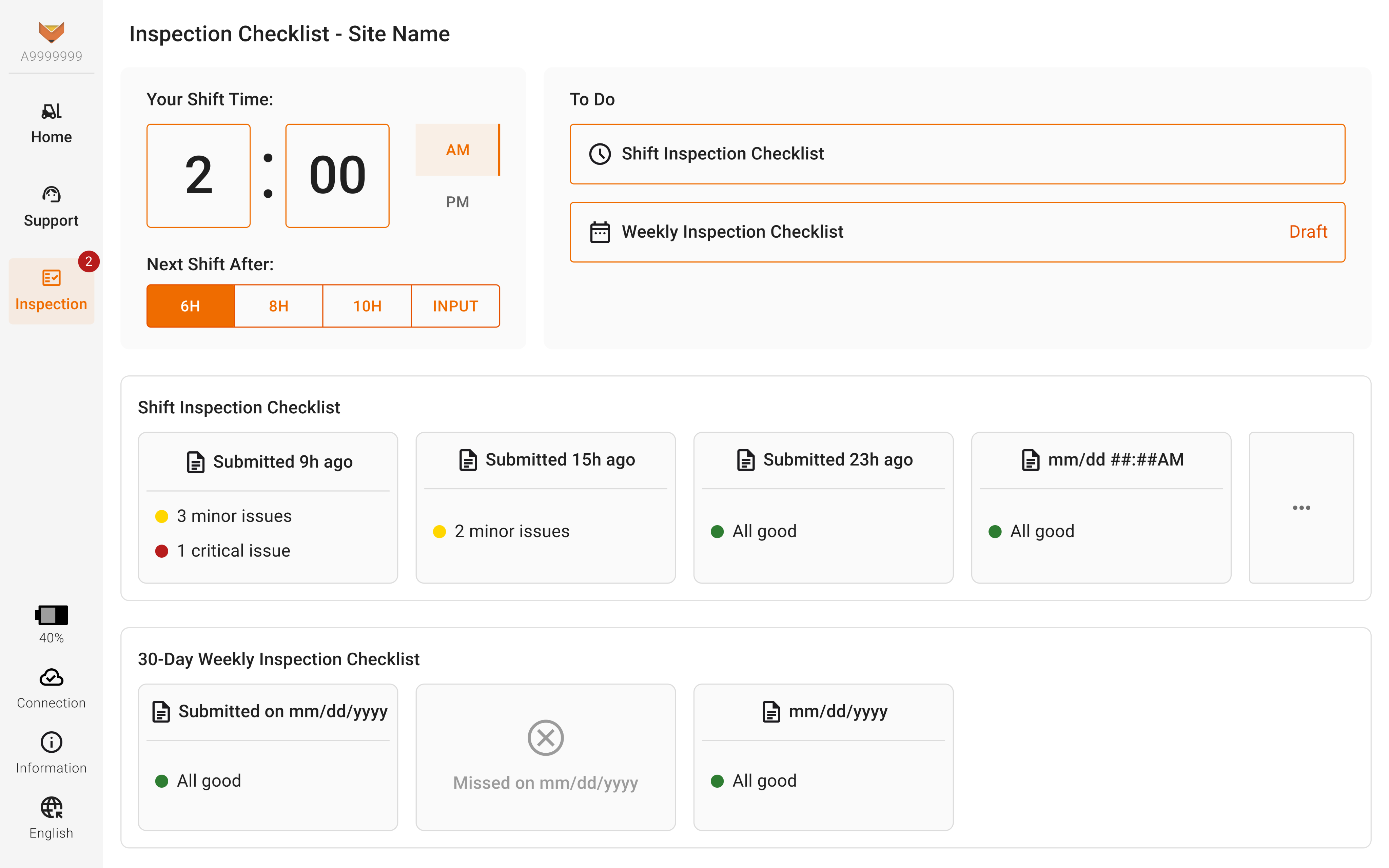
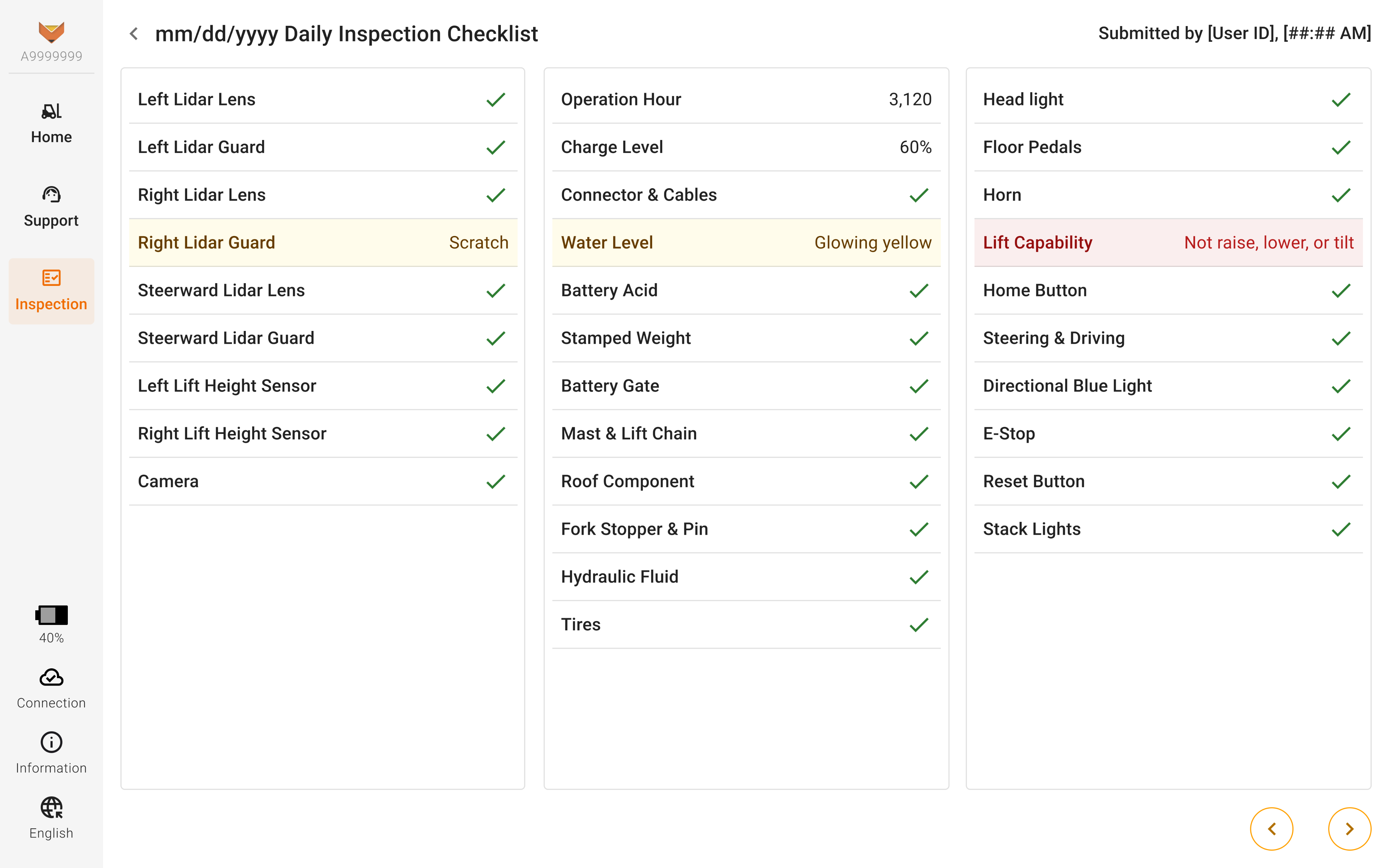
Global Reminder Badge & Clear Dashboard
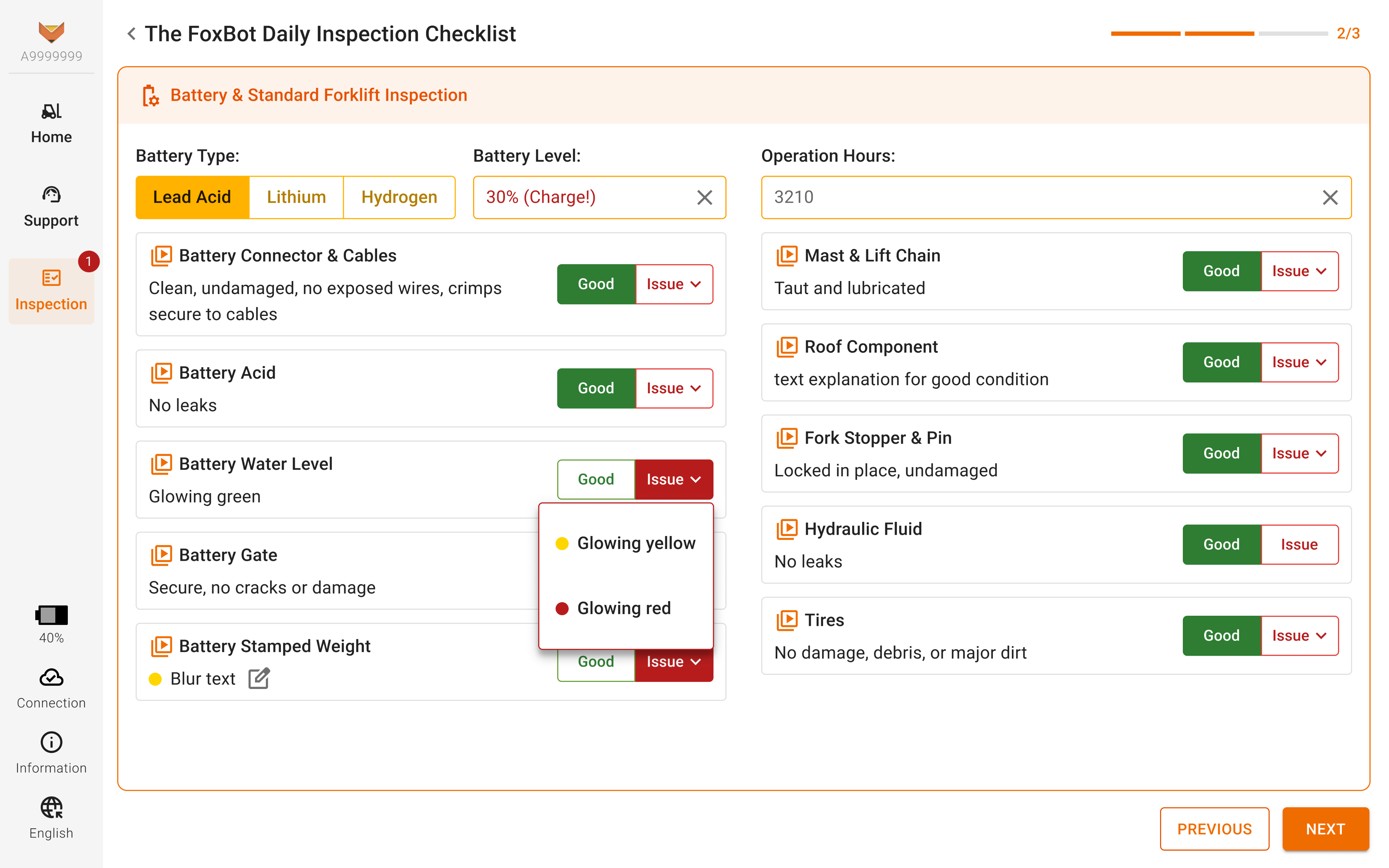
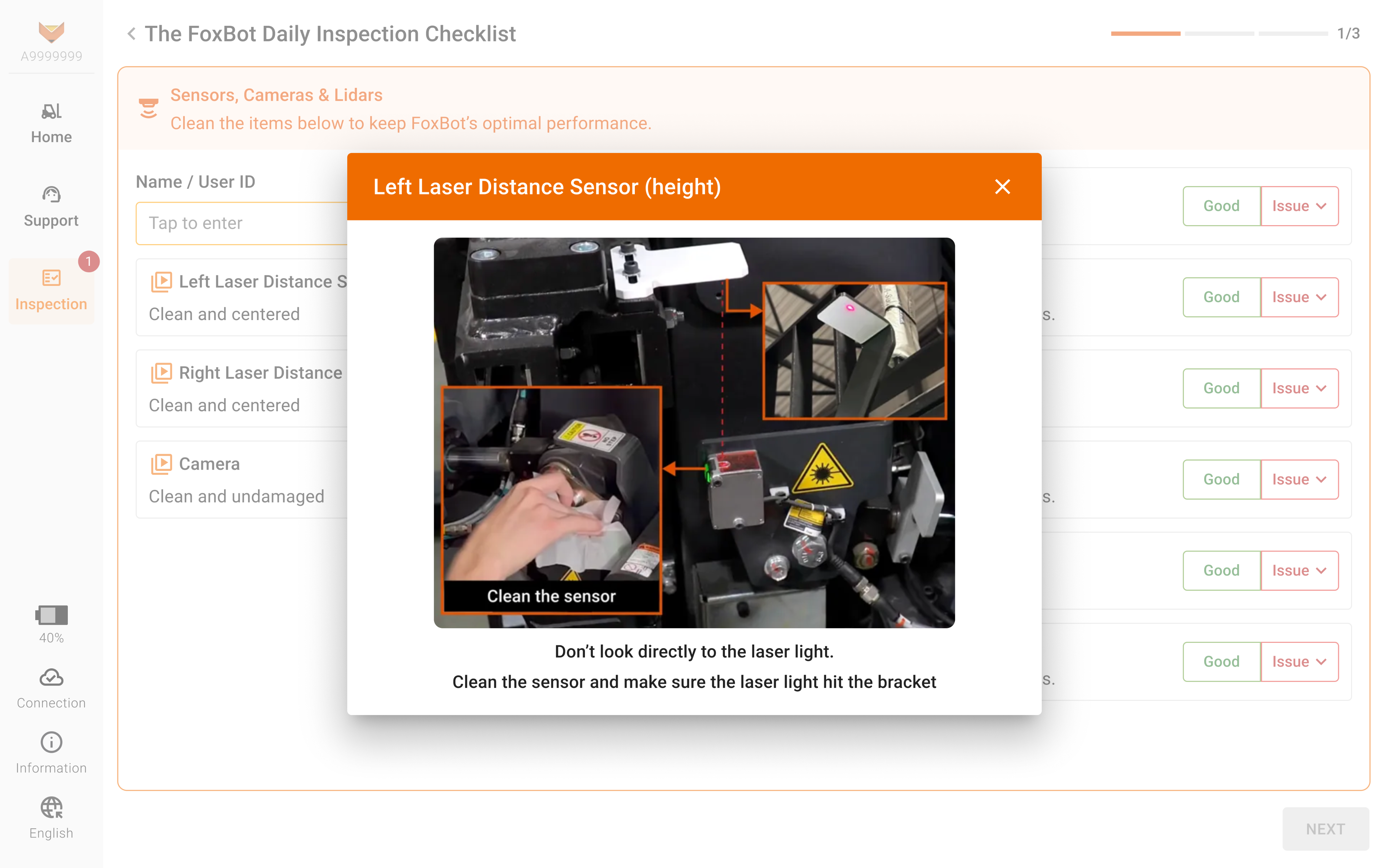
Accessible Buttons for Efficiency
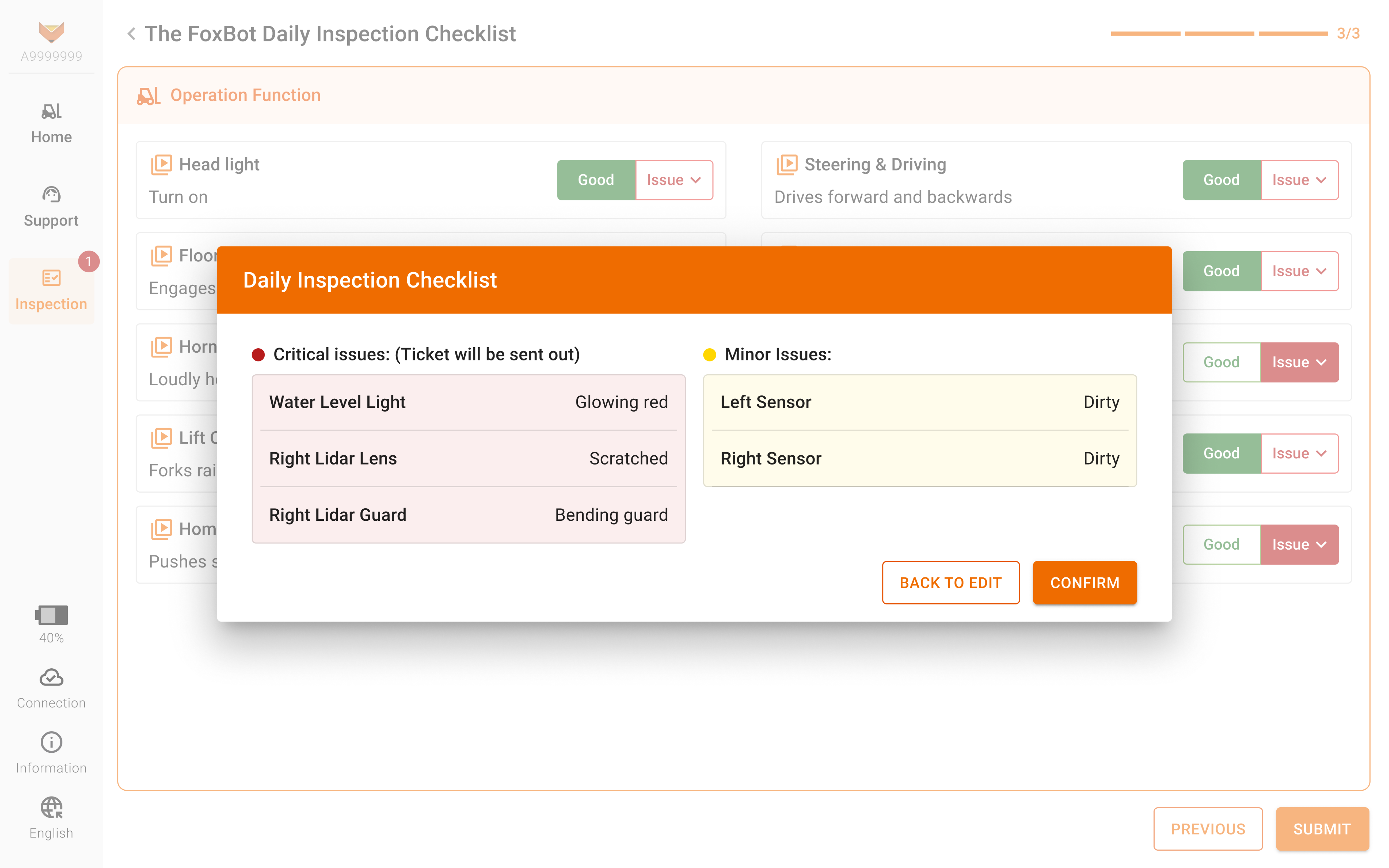
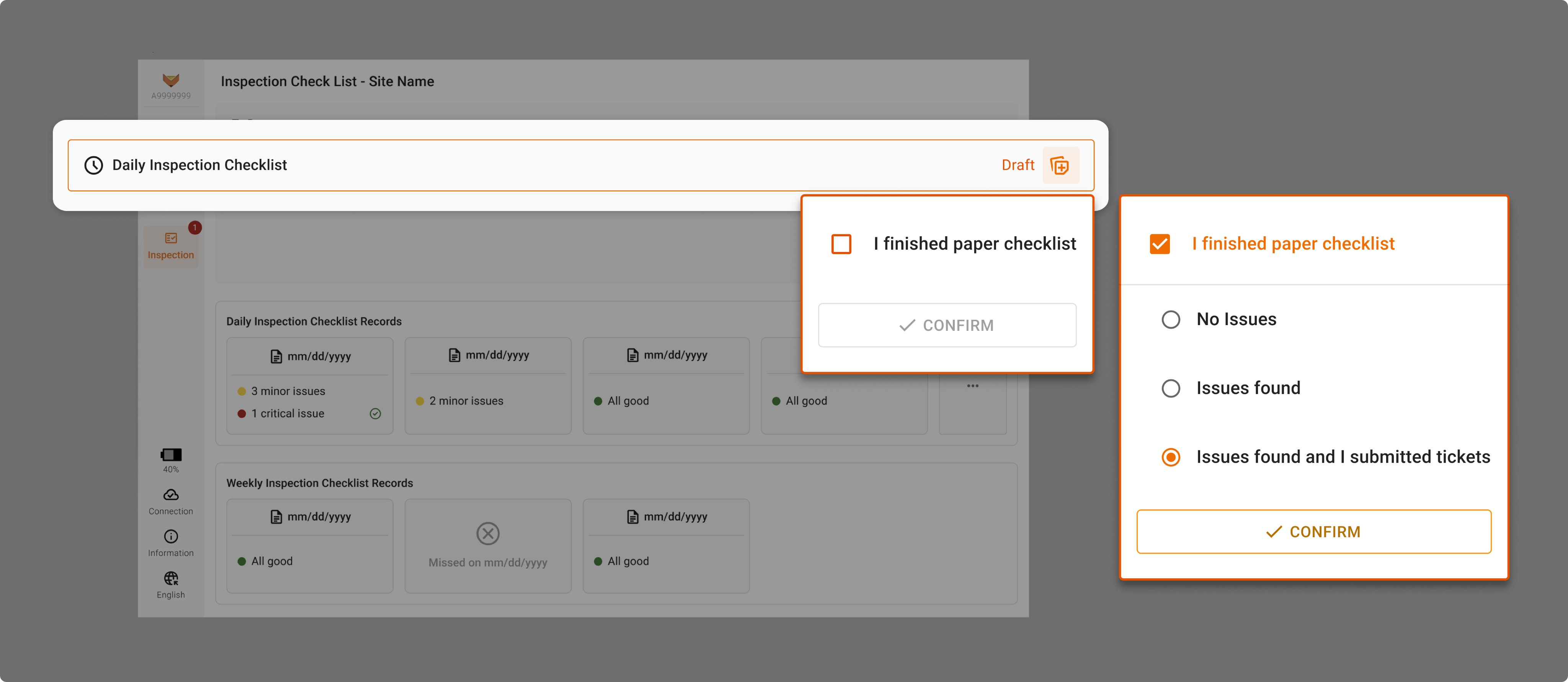
Clear Confirmation & Autonomous Issue Reporting
- Automatically create support tickets for critical issues so nothing gets missed.
- Organize issues by severity to help the support team focus on what really needs their attention.
Accessible Buttons for Efficiency
User Test & Iteration
I walked through the design with internal operator and SME to evaluate my design decision before I wrapped everything for user test at customer sites. Then I iterated the design beased on feedback
Key Testing Feedback
- Users want to review the full checklist before submitting, not just the flagged issues.
- Certain items aren’t inspectable by regular operators at some customer sites.
- Category labels are clear, but the order doesn’t match the actual inspection workflow.
Design Iteration

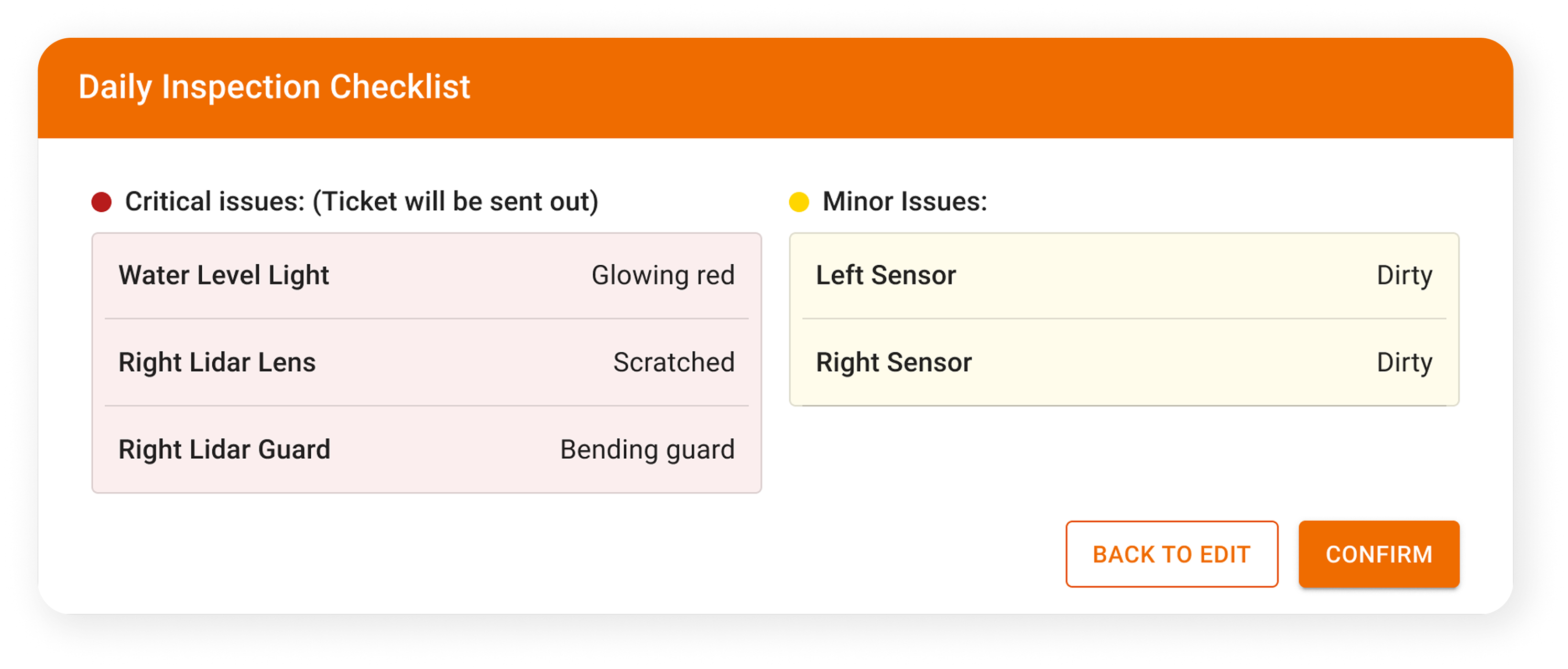
Before
A popup only showed issues, limiting users to review the full form before submitting.

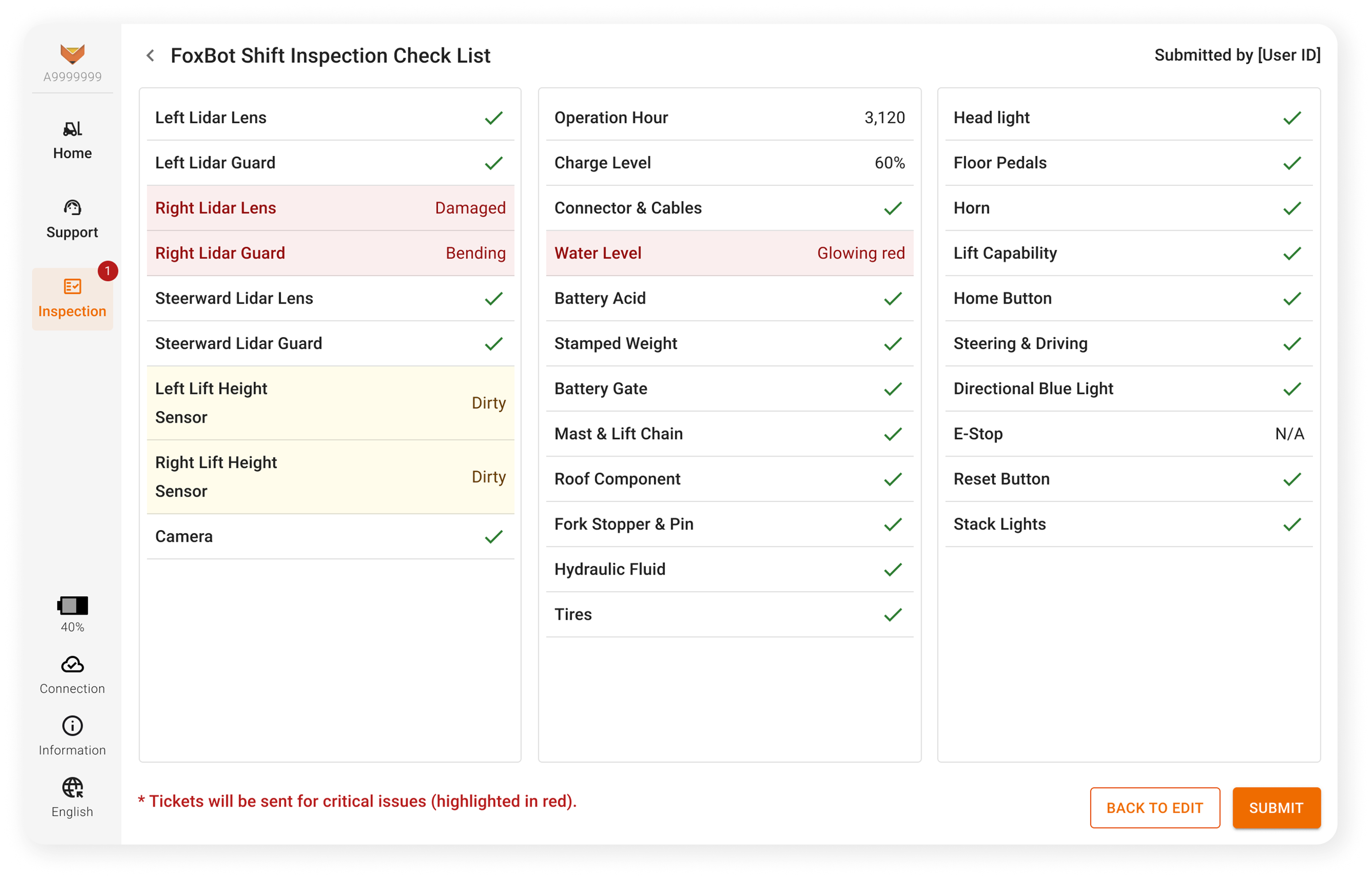
After
Users can now review the entire checklist—including issues and all other inputs on 1 page, ensuring accuracy and confidence before submitting.
Before
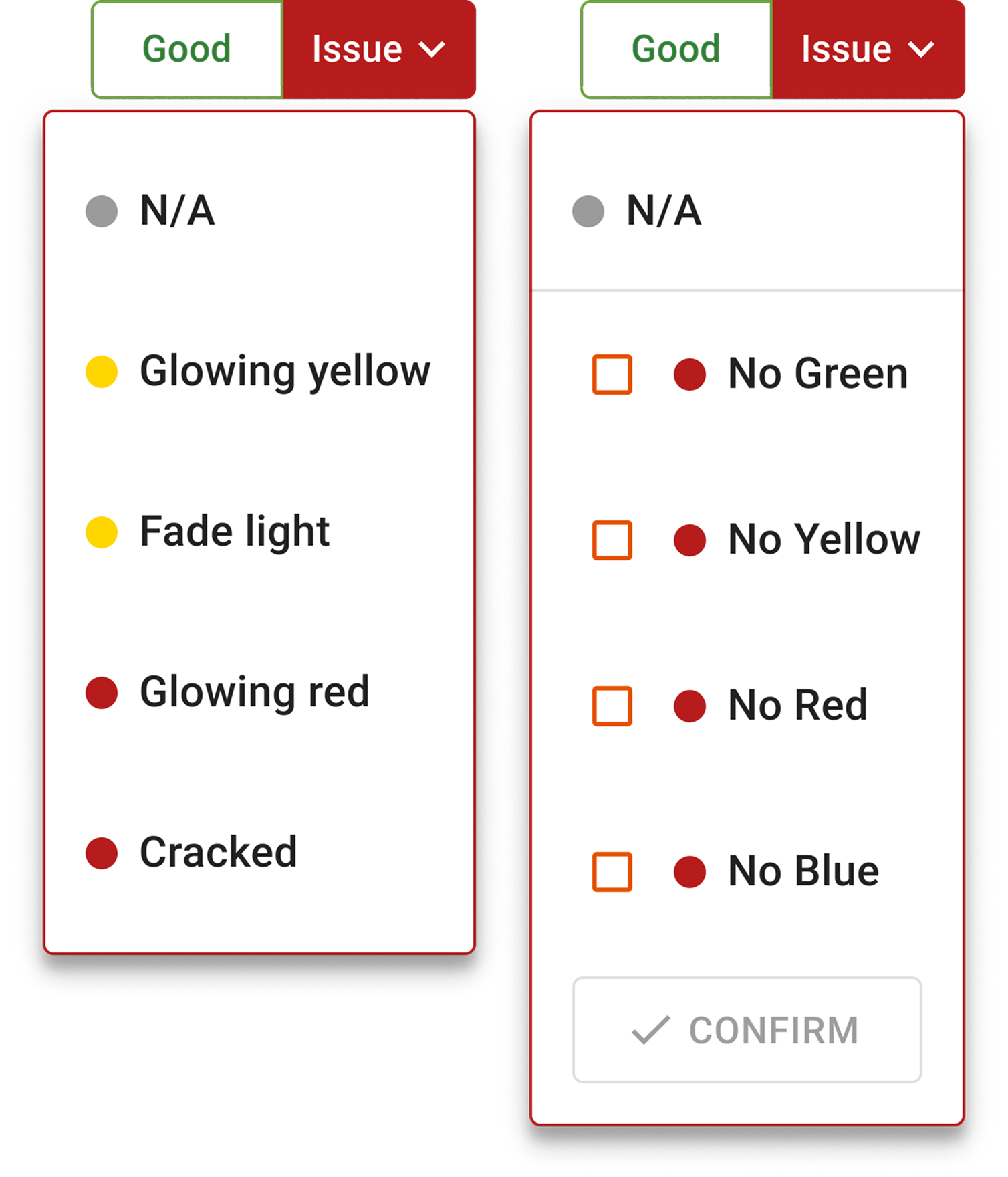
Operators couldn't skip un-inspectable items or log uncommon issues. Additionally, the 'tap outside to close' overlay was unintuitive for senior, less tablet-familiar warehouse staff.
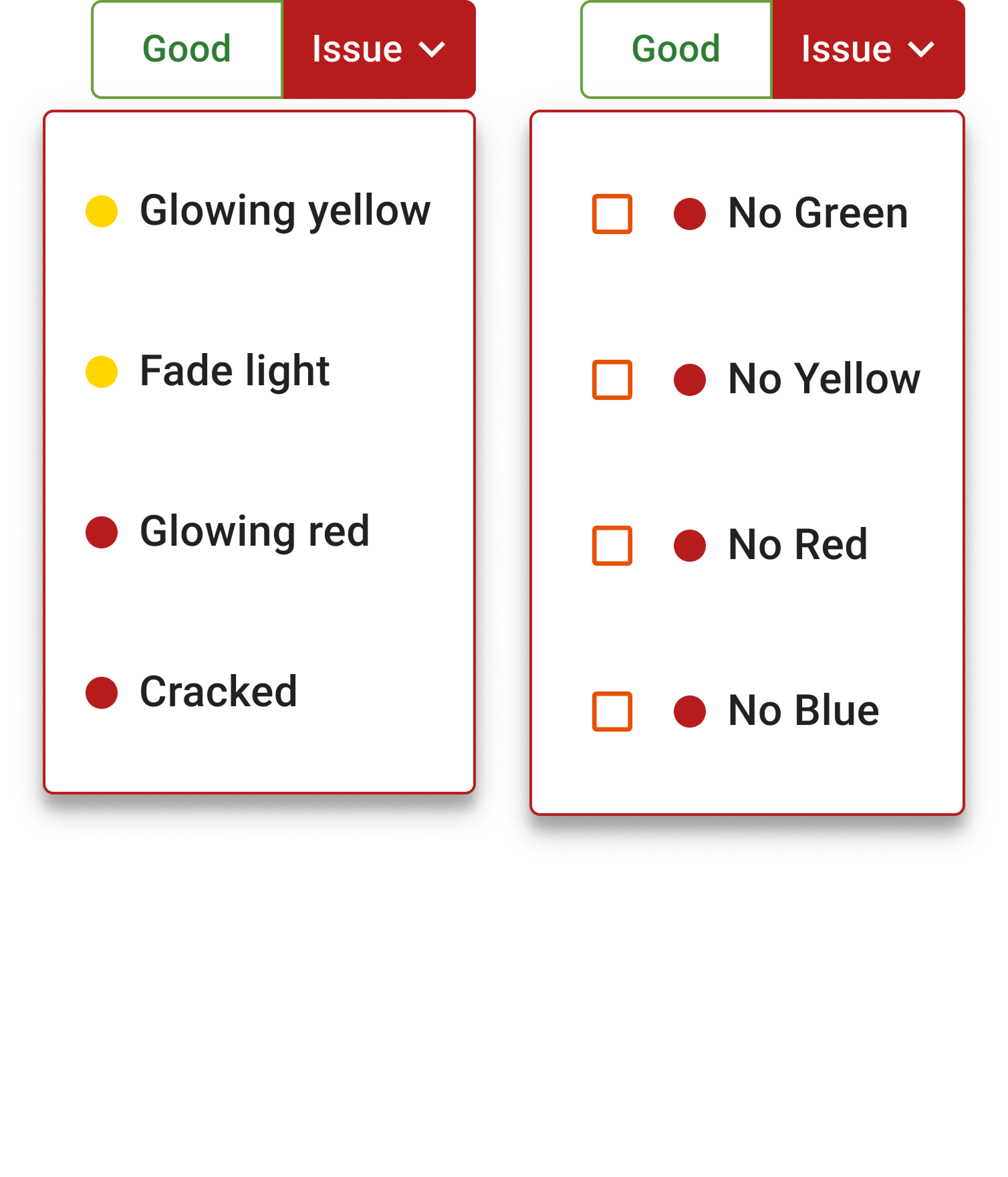
After
Introduced a grey 'N/A' option for seamless skipping or logging of uncommon issues, and a 'Confirm' button in selection menus for intuitive user confirmation and exit.
UX Update
I performed the full inspection and form submission process in the warehouse to better understand real-world challenges, then incorporated suggestions from internal operators and test engineers to ensure the form item order aligned with actual workflows.
Final Delivery
I walked through the design with internal operator and SME to evaluate my design decision before I wrapped everything for user test at customer sites. Then I iterated the design beased on feedback
Figma Files
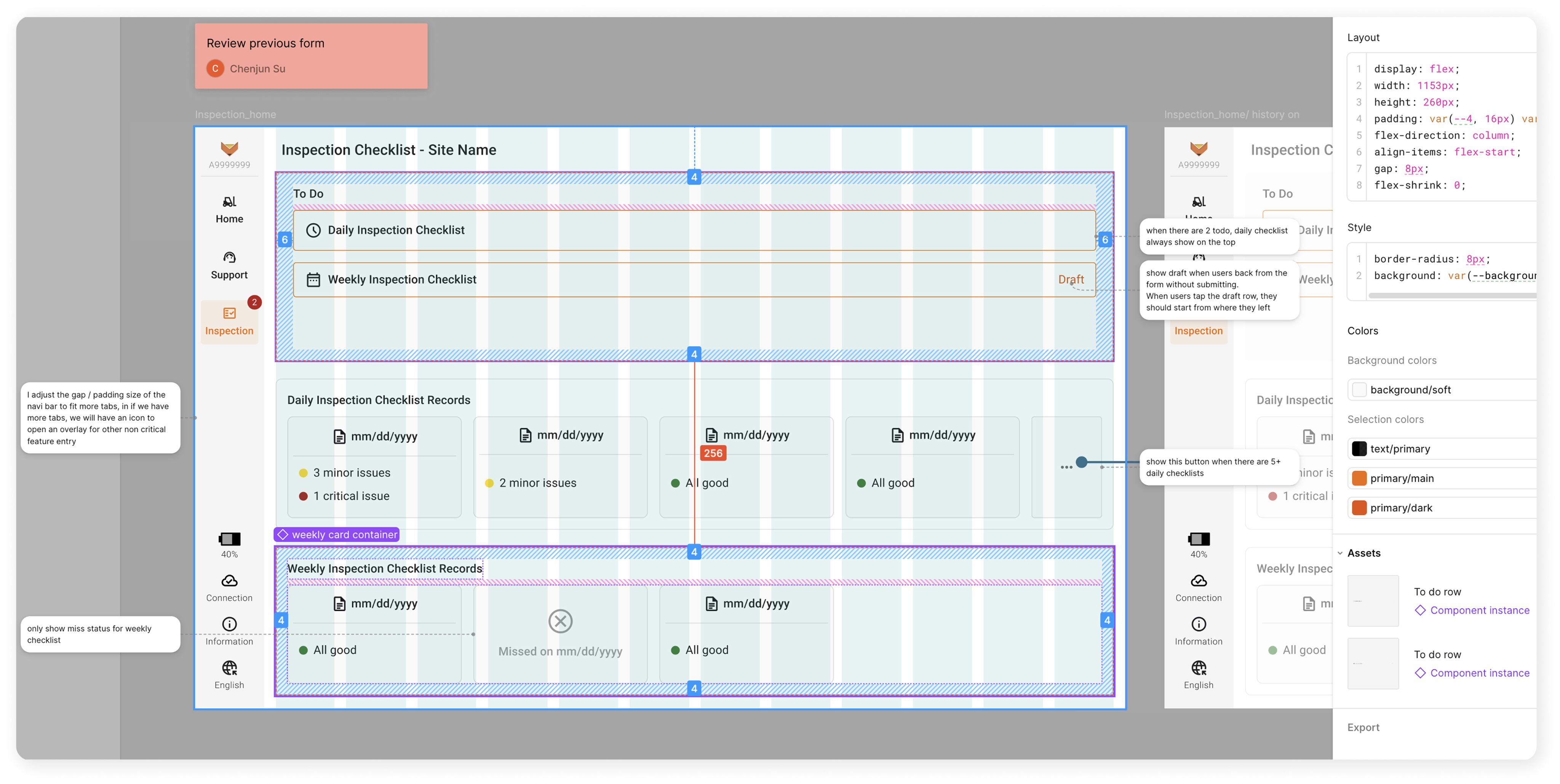
Annotated workflow-based screen mockups in Figma with annotations of UI details, interaction behavior, and a brief use case.
Spreadsheet Details
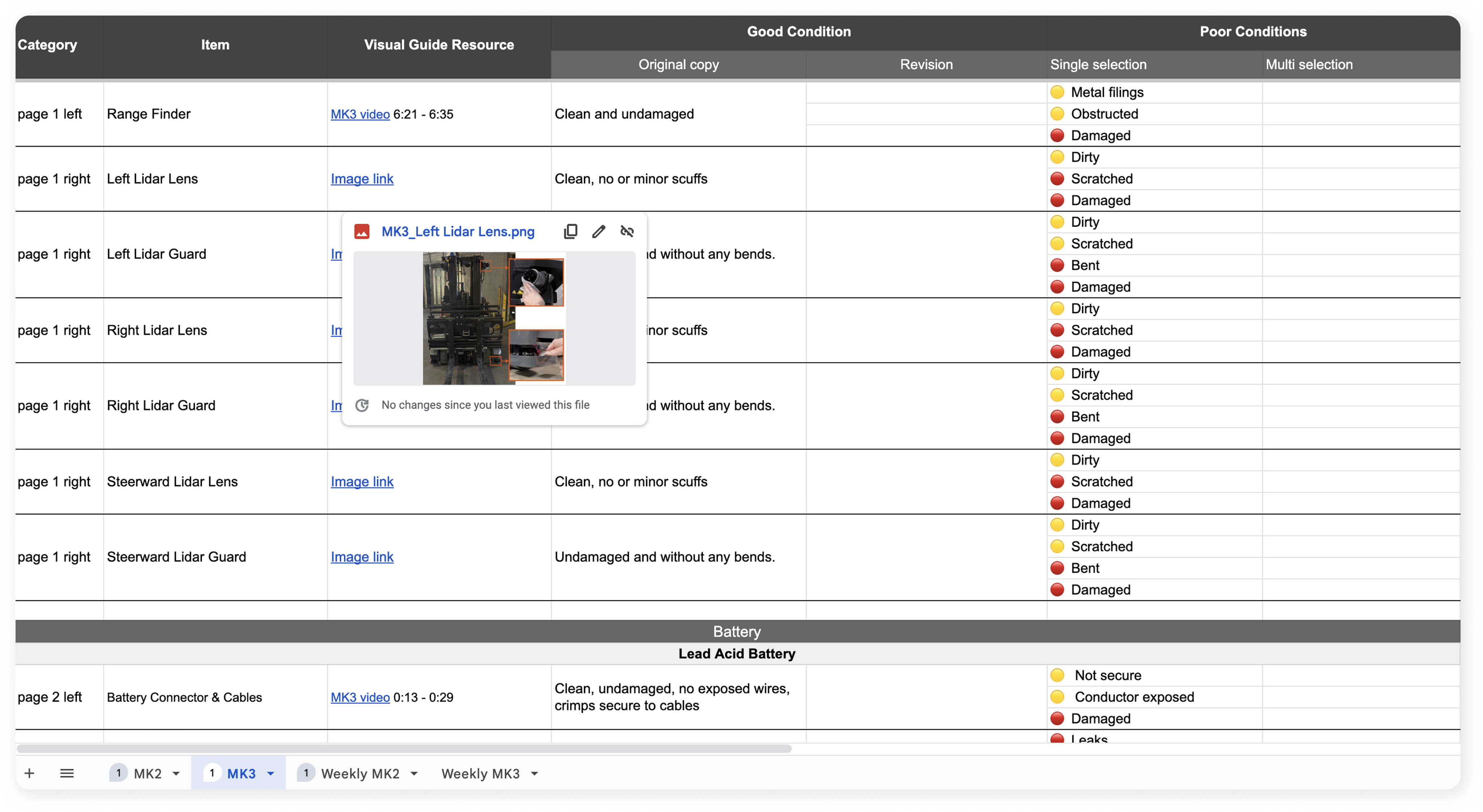
Worked with the support team to define issue severity levels and structured detailed information for each item. The finanl spreadsheet
Impacts
71%
Adoption Rate
91%
Completion Rate
+15.3%
Picks / Month
-$5000
Cost Saving/ Month
Optimized Inspection: Ops Forms
0-1 product lead - optimized operator inspection form submission and issue report
My Contribution
Product Lead

Research to Scope
Own cross team alignment, user research, and PRD scoping to link business goals with real user needs and technical feasibility for the 0→1 feature
Product Designer
Design
Designed and tested a new tablet feature; delivered mockups with full annotations and product specs to support development
Team & Delivery
Hand-offs
1 Designer (me) | 3 App Engineers | 3 Deployment Engineers | 5 SMEs (Subject Matter Expert)
Research Report | Product Requirements | Hi-fi Design Mockups | Spreadsheet for Dev Schema
Impacts
Impacts
Achieved 70% adoption with 91% completion rate, reduced $5000 monthly labor costs
Reduced 3min downtime / trailer, improved 15.3% robot production
What & Why
Context
Operators should complete a paper inspection checklist before starting the FoxBot.
Business Pain Points:
- <10% of customers complete checklists
- ~50% of support tickets are due to missed inspections.
- The support team lacks context when issues arise.
Opportunities:
- Digitize the checklist in the tablet app
- Remind users to complete inspections
- Gain data to streamline customer support process
Research To Scope Product

Back
After the PM's departure, I aligned with leadership and cross-functional teams to clarify the problem space. I planned and conducted user research to bridge the gap between the business proposal and real user pain points, ultimately using design to articulate actionable product requirements.
User Journey 1: Inspection
User Journey 2: Issue Reporting
Ideation - New Workflow

Prioritization & Trade-off
Target Users
- Focused on field operators and managers for phase 1
- Excluding internal users due to service mode API limitations.
Form Review (Data Consuming)
- Customers can review forms directly on the tablet; remote access isn’t supported yet due to missing authentication.
- JSON output for internal use as a temporary solution. Phase 2 will bring the same review experience to the internal web tool for internal users. PDF export is out of scope.
Missing Data
- Battery level and operation hours: manually entered by users in phase 1. (I requested the vehicle team to build an API for future automation.)
- Battery types: no API planned since customers can change types, so users will simply select they type at the begining to load the right form.

Design Principles & Matrix
Back
- User Goal: Provide clear user reminders and quick access to checklist items to boost efficiency. Ensure 50% adoption rate and 85% completion rate.
- Business Goal: Streamline issue reporting and automate customer support workflows, aiming to improve 8% production and reduce $4000 monthly labor costs.
Global Reminder Badge & Clear Dashboard
Accessible Buttons & Visual Guidance for Efficiency
Clear Confirmation & Autonomous Issue Reporting
- Automatically create support tickets for critical issues so nothing gets missed.
- Organize issues by severity to help the support team focus on what really needs their attention.
Easy Access to Review & Compare History Data
User Test & Iteration
Back
I walked through the design with internal operators and SMEs to make sure it made sense before testing with customers. Their feedback helped me refine the design to better match real-world use.
Key Testing Feedback
- Users want to review the full checklist before submitting, not just the flagged issues.
- Certain items aren’t inspectable by regular operators at some customer sites.
- Category labels are clear, but the order doesn’t match the actual inspection workflow.
Design Iteration
Before
A popup only showed issues, limiting users to review the full form before submitting.
After
Users can now review the entire checklist—including issues and all other inputs on 1 page, ensuring accuracy and confidence before submitting.
Before
Operators couldn't skip un-inspectable items or log uncommon issues. Additionally, the 'tap outside to close' overlay was unintuitive for senior, less tablet-familiar warehouse staff.
After
Introduced a grey 'N/A' option for seamless skipping or logging of uncommon issues, and a 'Confirm' button in selection menus for intuitive user confirmation and exit.
UX Update
I performed the full inspection and form submission process in the warehouse to better understand real-world challenges, then incorporated suggestions from internal operators and test engineers to ensure the form item order aligned with actual workflows.

Final Delivery
Back
- Figma design files for App team.
- Form item spreadsheet for App, Support and Training teams.
- Post launch plan for Data and PM teams
Figma Files
Annotated workflow-based screen mockups in Figma with annotations of UI details, interaction behavior, and a brief use case.
Spreadsheet Details
Collaborated with the support team to define issue severity levels and organize item details including categories, wording and visual guidance, enabling engineers to efficiently build the schema.
Next Step Agile By Design
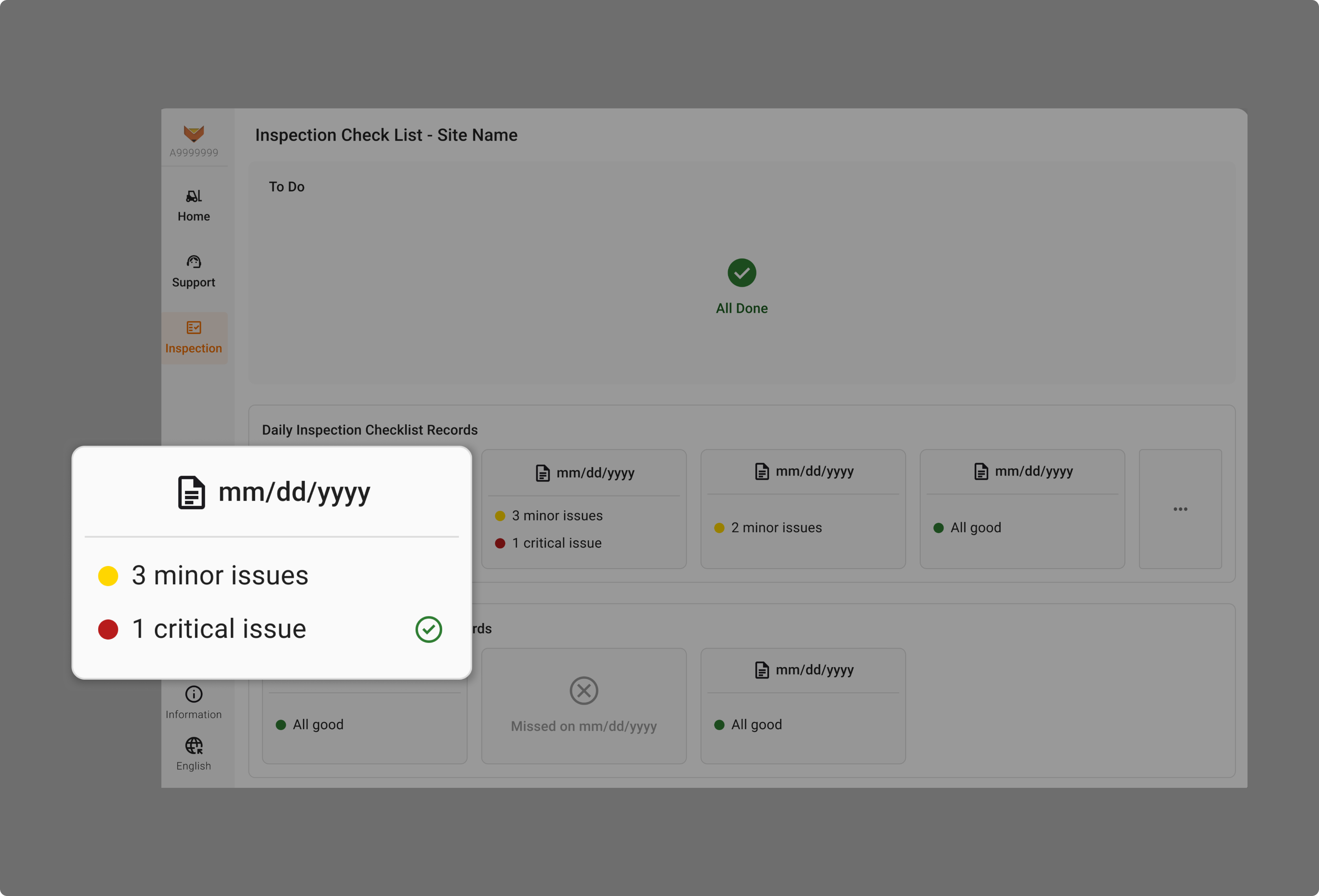
(1). Know What’s Been Resolved
I recommend adding a checkmark to the history form card to indicate if an issue has been resolved based on the ticket platform API performance after the 1st release.
(2). Paper-Based Backup for Unexpected Failures.
We'll use post-launch data on failure frequency to evaluate whether to prioritize this alternative flow

Impacts
Back to top
71%
Adoption Rate
91%
Completion Rate
+15.3%
Picks / Month
-$5000
Cost Saving/ Month

All Projects
Next: PL Alert
