

Fault Clear
Delivered 3 user-focused designs aligned with the cross-team agile plan within a tight timeframe.
My Contribution
Product Lead
Defined customer needs, aligned cross-functional teams on an agile plan, and delivered a scalable PRD to unblock engineering.
Product Designer
Delivered 3 agile-aligned designs in tight timeline and iterated based on internal testing and customer feedback.
Team & Delivery
3 App Engineers | 3 Deployment Engineers | 5 SMEs
Research Report | PRD | Hi-fi Mockups | Spreadsheet for Dev Schema
Impacts
Boosted 48% robot utilization, cut 41%support tickets, and secured contract renewal with a scalable solution.

What & Why
Problems:
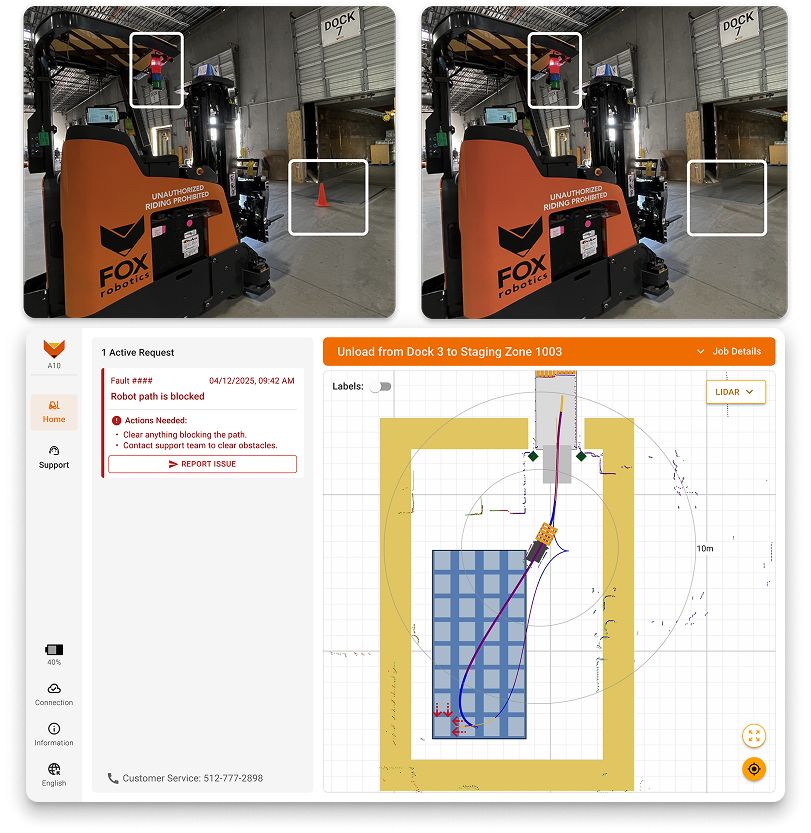
- Robots stop for non-existent obstacles retained in 3D LiDAR memory.
- Customers must contact the us to clear, significantly reducing efficiency and the robot utilization.
- These ongoing inconveniences discourage customers from renewing contracts.
What I did:
- Aligned cross-functional teams to understand the user needs and brainstorm solutions.
- Designed a manual fault-clear workflow to let operators safely resume work without backend support.
- Iterated designs based on test results and delivered 3 designs aligned with the agile plan in tight timeline.
Cross Team Alignment
Team Goals:
- Deliver customer-requested functionality to retain all robots on-site within 2 sprints.
- Develop a safe, user-friendly, and scalable solution across the fleet in 3 months.
Design Challenges:
The autonomy team needed a quick UI for testing. But it’s unclear what info users would need to do it safely. I also flagged the risk that clearing removes all LiDAR points, which may lead to collisions if obstacles are missed.
Aligned Design Plan:
- Phase 1 - provide basic UI to enable internal testing. (1 sprint)
- Phase 2 - address safety and UX concerns for the target customers based on the test insights. (2 sprints)
- Phase 3 - Collect customer feedback and iterate design for broader rollout. (3 months)
Phase 1 For Internal Test
Basic UI Solution
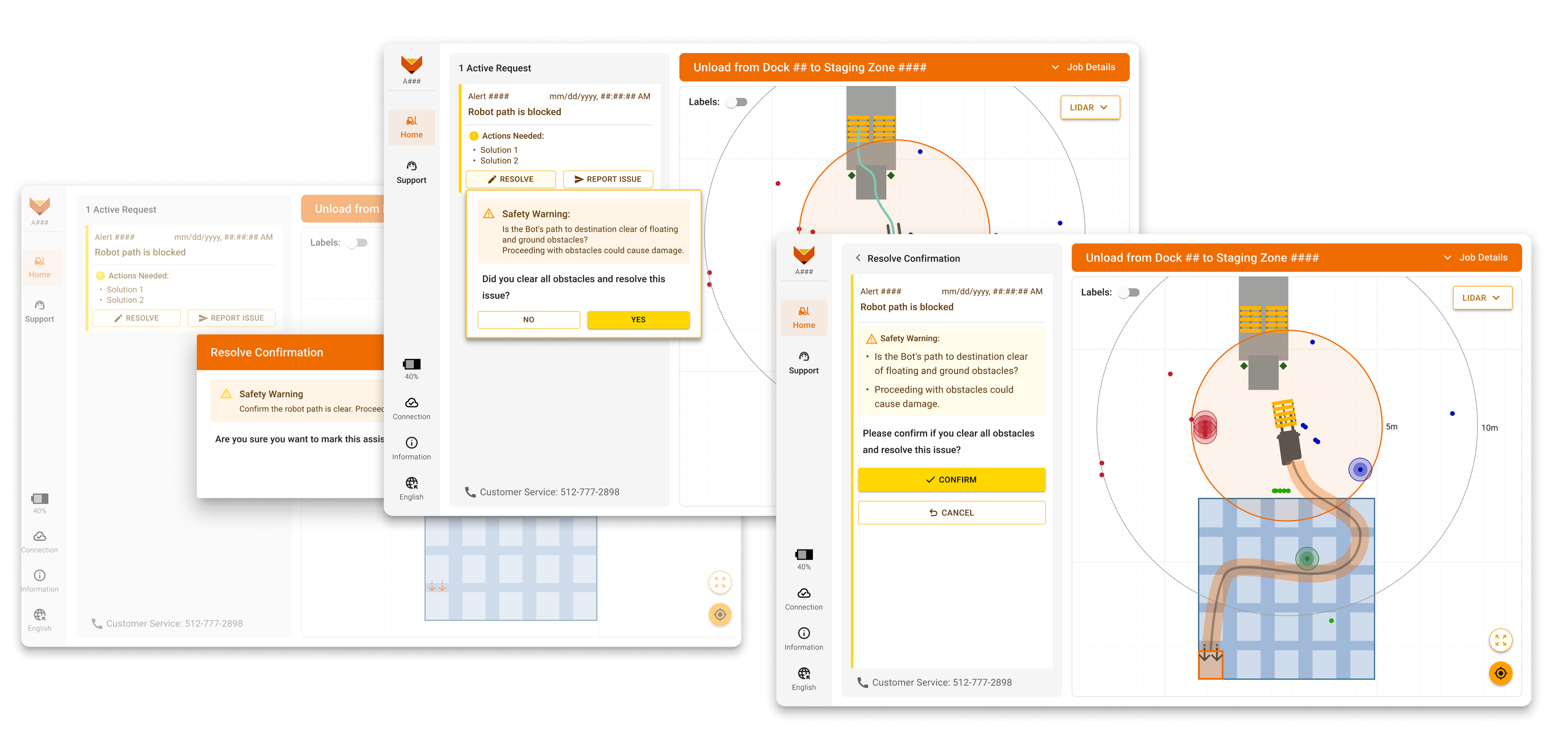
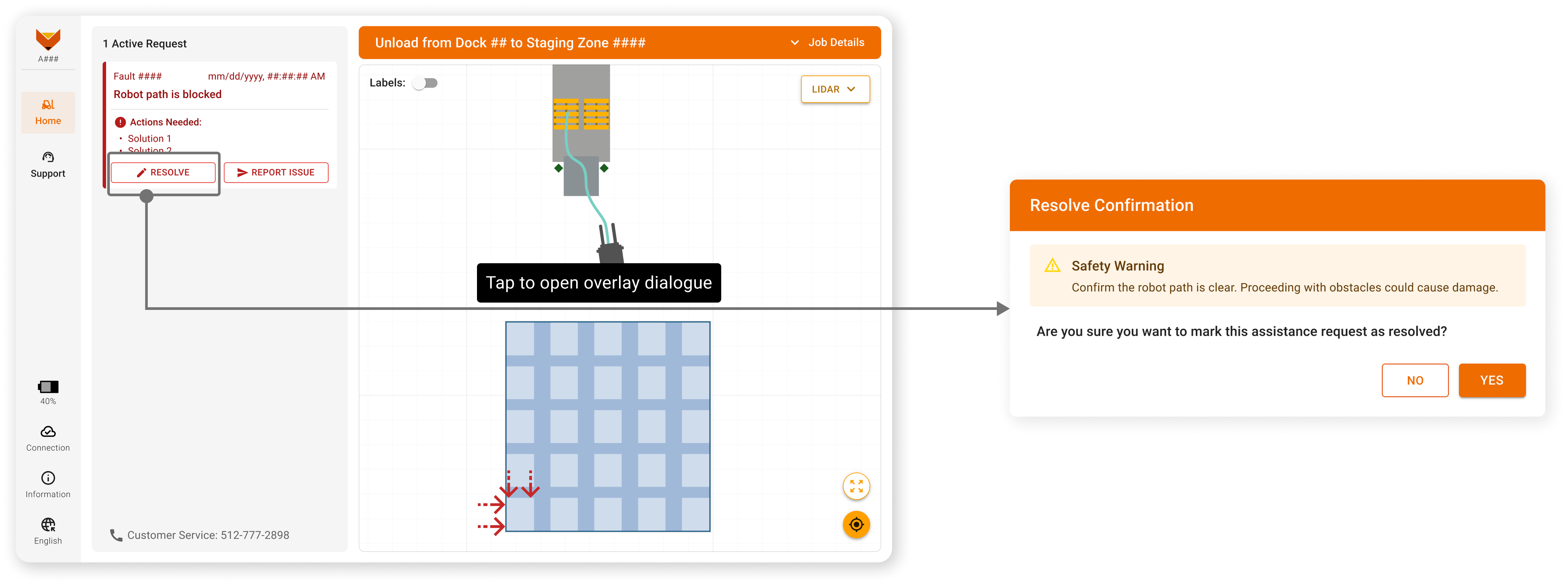
To unblock engineering internal tests for the basic function, I quickly designed a simple UI with a fault-clear button and a confirmation overlay dialogue to highlight the risk.
Internal Test
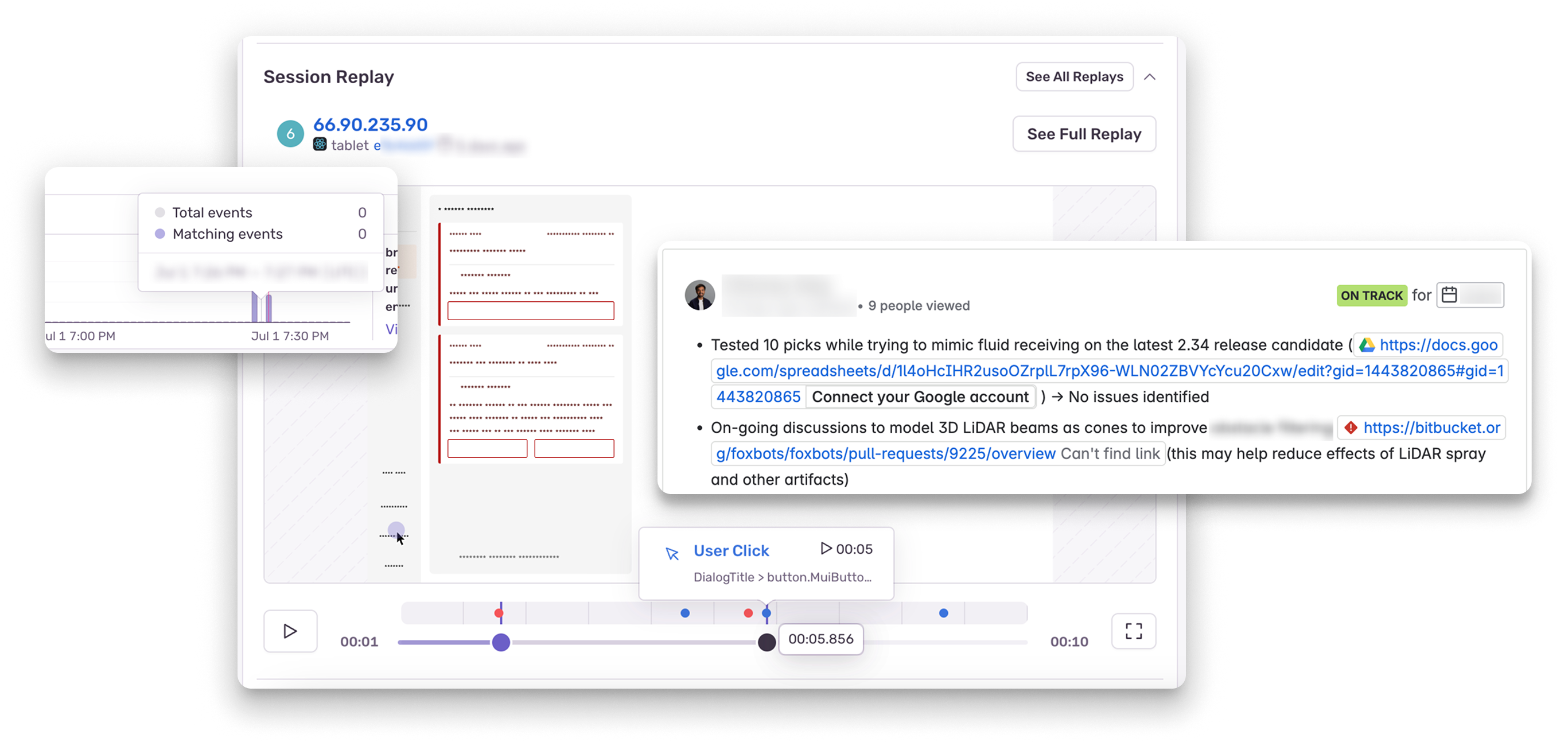
- I collaborated with engineers for internal testing at the warehouse and used Sentry for insights into user behavior.
- The operators dismissed the warning to activate LiDAR on the map, then they assessed both the map and the robot’s environment. Finally, they reopened the dialogue to confirm.
Test Insights
- The operators tend to close the overlay to activate LiDAR on the map, then they assessed both the map and the robot’s environment. Finally, they reopened the dialogue to confirm.
- Even the internal operator chooses to reach out to the support team for assistance rather than tackling it manually, given that the severity level is highlighted in red.
Phase 2 For Customer Release
Design Iteration
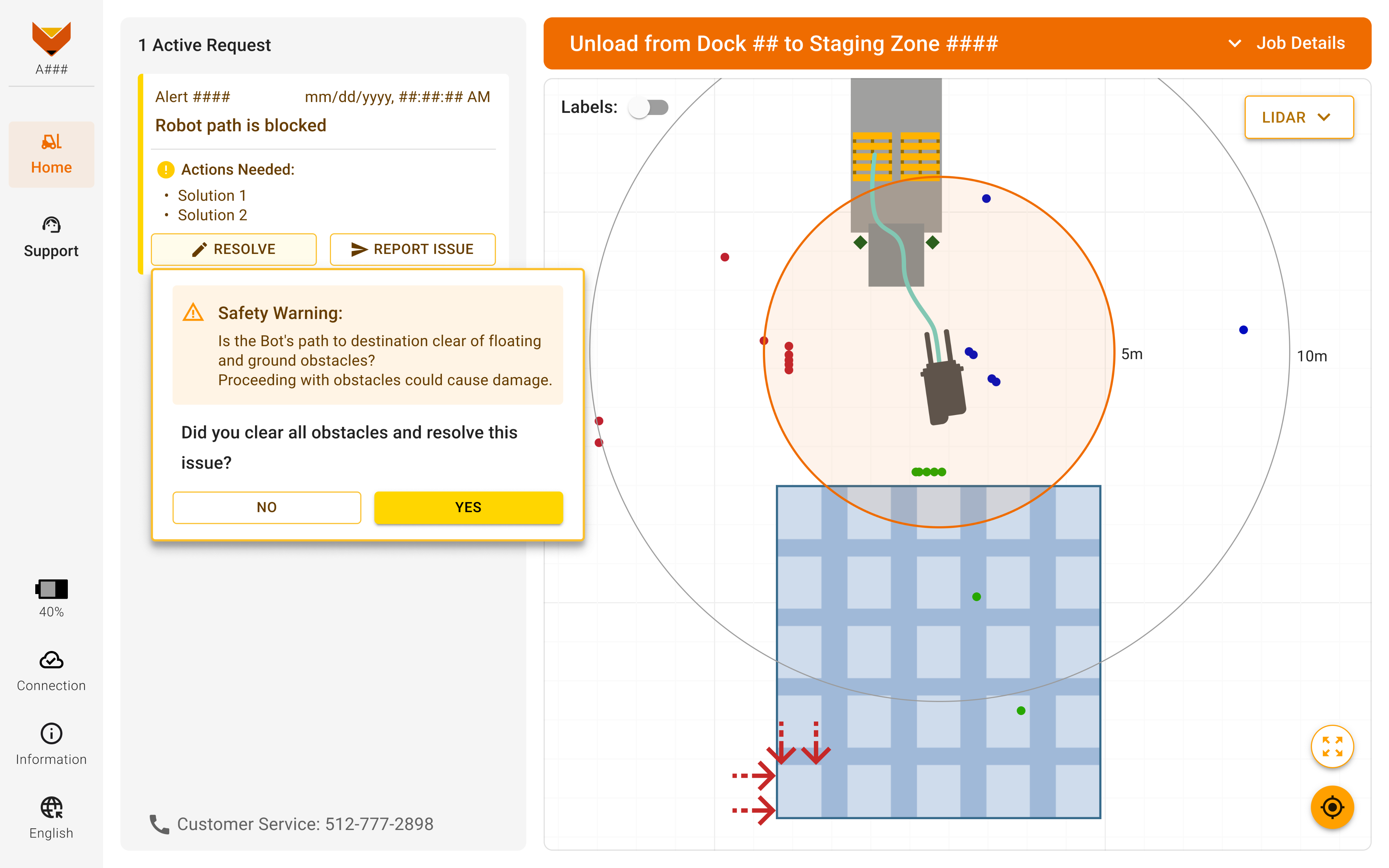
- Kept the map visible with the 5m inspection area highlighted.
- Auto displayed LiDAR points when a fault occurred, and updated the warning text per safety feedback.
- Requested engineers to change the severity level to medium to increase users confidentce
Impacts
- The customer renewed their contract to retain all existing robots on-site.
- This reduced half of the support tickets for the fault and a 31% increase in robot utilization.
Phase 3 Design: UX Upgrade for All Customers
User Feedback
- Users wanted to see which LiDAR points triggered the fault, so I worked with the autonomy team to expose fault-specific data via API—enabling the app to highlight and animate them for better context and confidence.
- Users often try to interact with the map before confirming since they want to ensure nothing is missed.
Step 1 Design Rationale
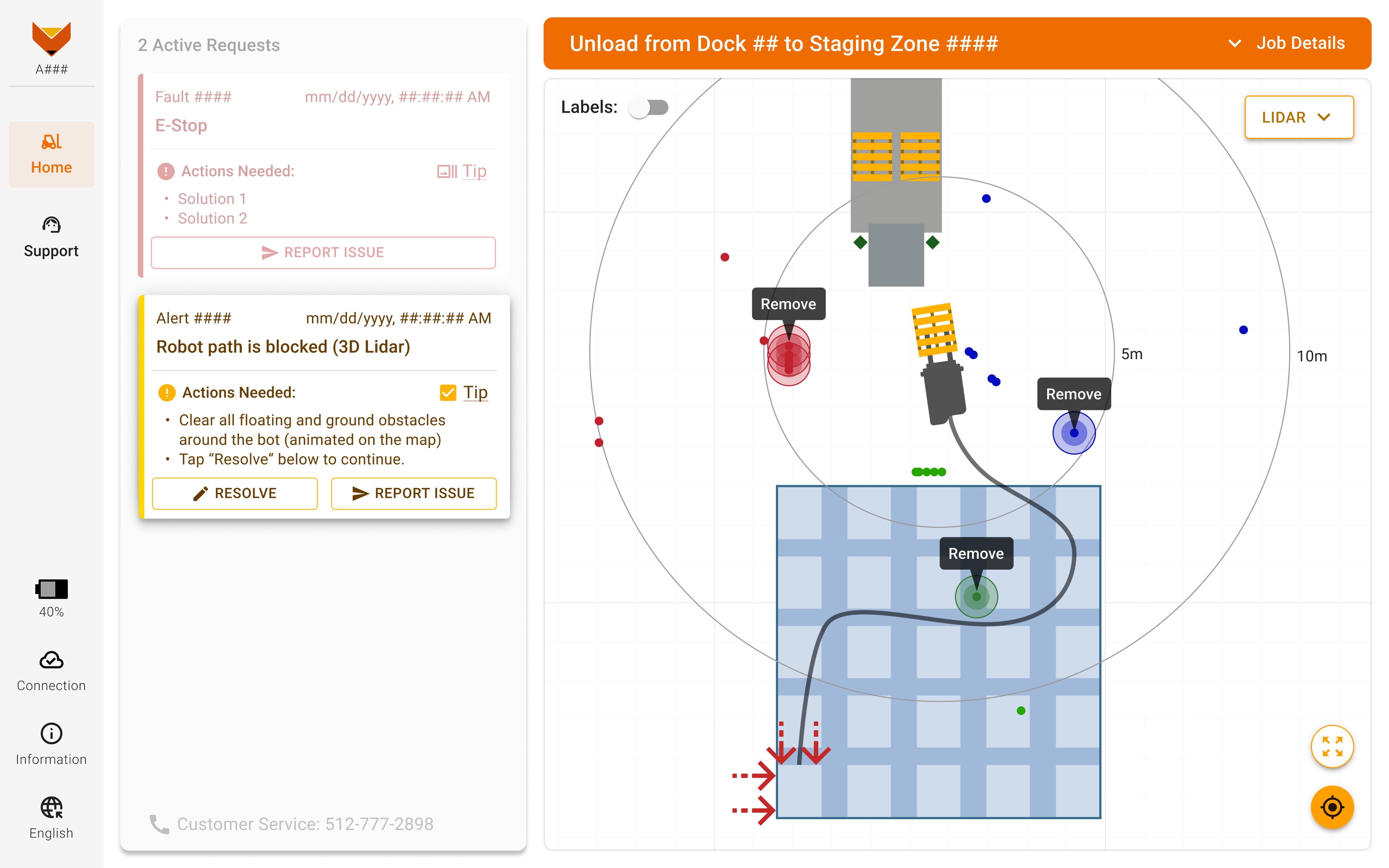
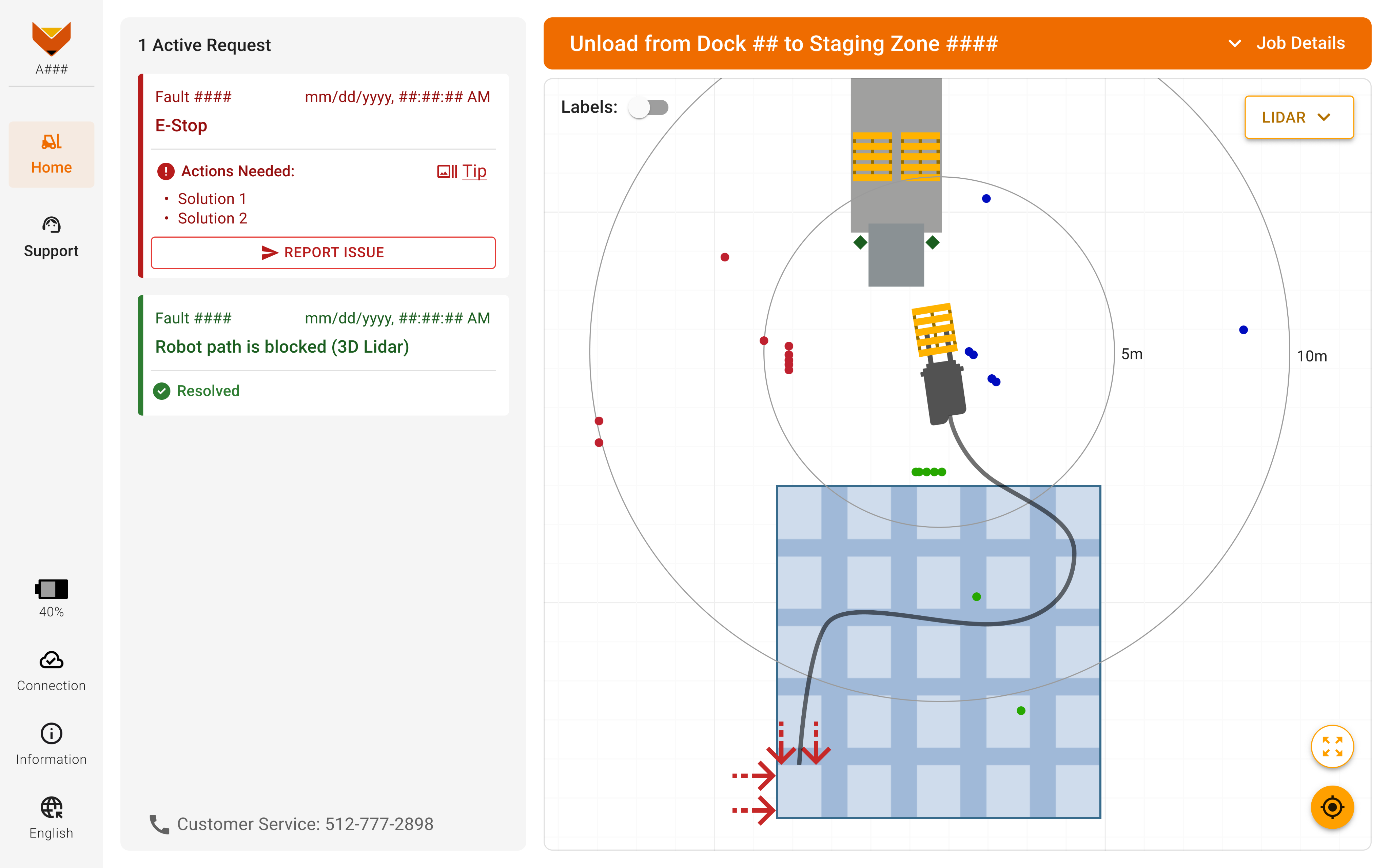
- When this fault occurs, a dedicated fault card with instructions appears in the Active Requests panel.
- The 'Tip' checkbox is auto-selected to display visual cues on the map, and users can toggle it to manage visibility when multiple faults occur to keep map clean.
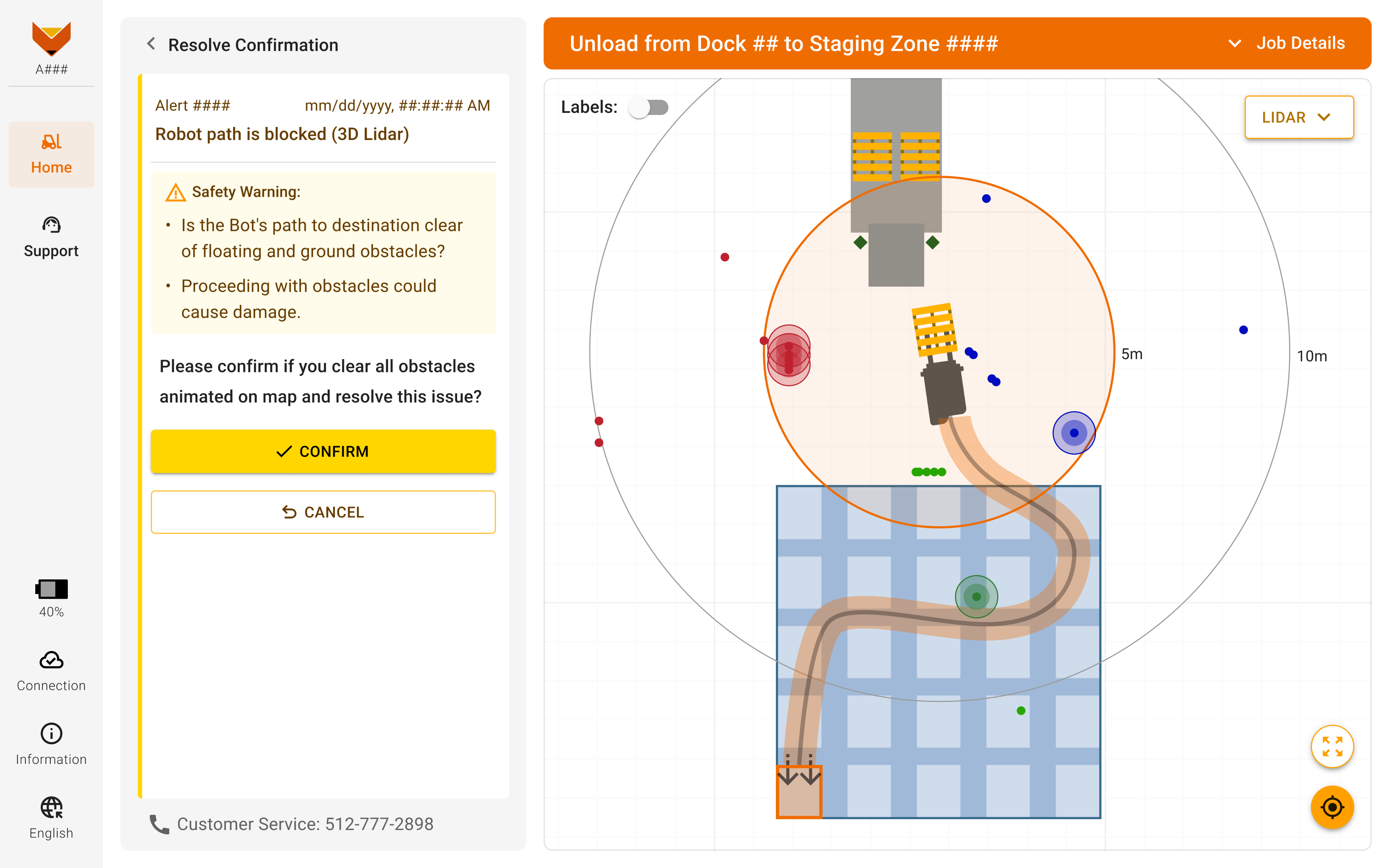
Step 2 Confirm Resolution
After users remove all obstacles and choose to resolve the issue, a warning confirmation appears. I replaced the popover with a dedicated subpage, allowing users to interact with the map for a double check and prevent overlapping issues.
Step 3 Success & Fail Indication
After confirmation, the side panel returns to the Active Requests page and displays the issue as resolved.
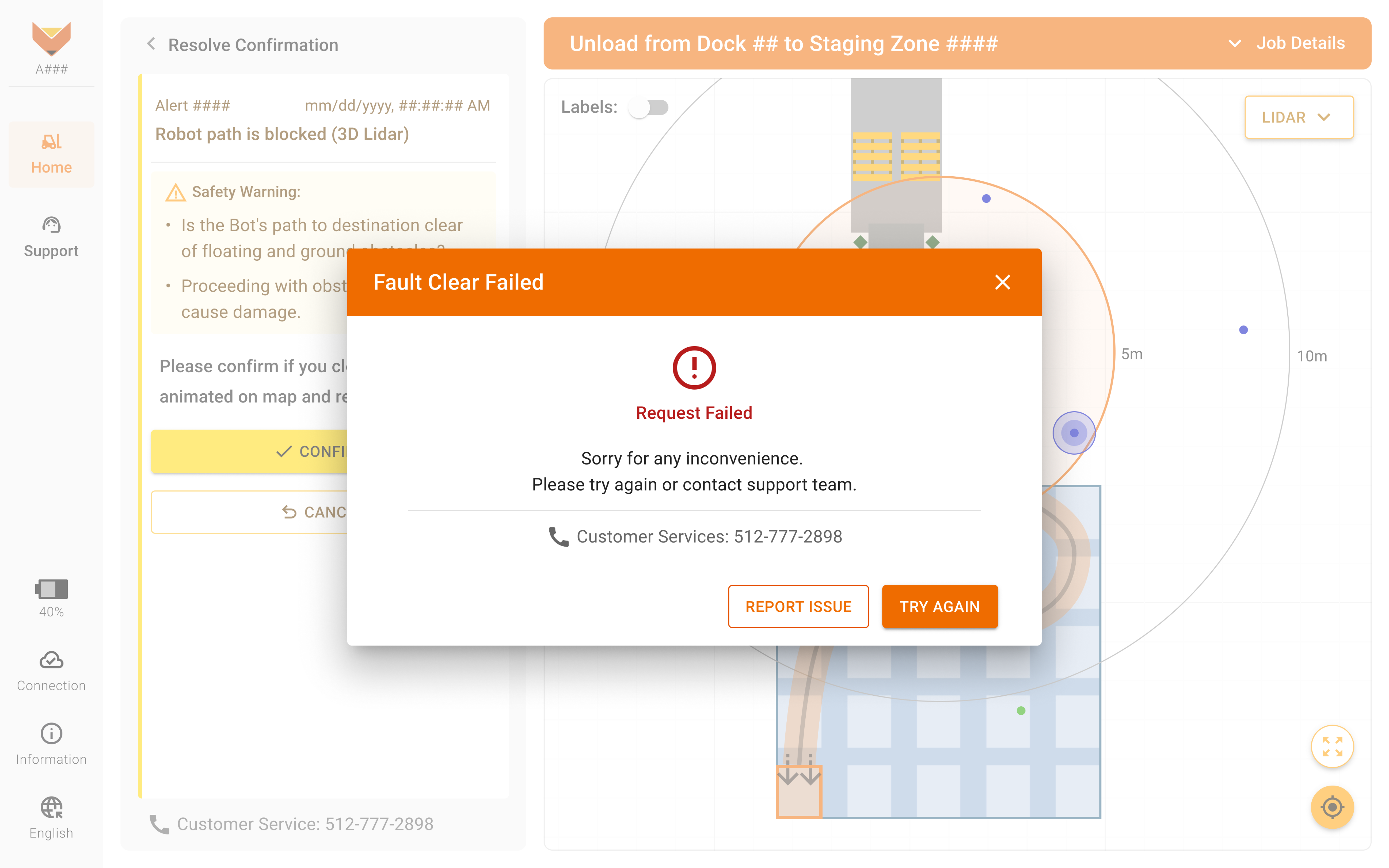
If something goes wrong, users see a clear message with a 'Report Issue' button to quickly get help—either by submitting a ticket or calling support.
Impacts
+48%
Robot Utilization
-41%
Support Tickets
-2 min
Downtime
+$58k
ARR
Boost Robot Utilization: Fault Clear
Delivered 3 user-focused designs aligned with the cross-team agile plan within a tight timeframe.
My Contribution
Product Lead
Defined customer needs, aligned cross-functional teams on an agile plan, and delivered a scalable PRD to unblock engineering.
Product Designer
Delivered 3 agile-aligned designs in tight timeline and iterated based on internal testing and customer feedback.
Team & Delivery
1 Designer (me) | 3 App Engineers | 3 Autonomy Engineers | 2 Test Engineers | 1 Safety Specialist
Product Requirements | Hi-fi Design Mockups
Impacts
Boosted 48% robot utilization, cut 41%support tickets, and secured contract renewal with a scalable solution.
What & Why
Problems:
- Robots stop for non-existent obstacles retained in 3D LiDAR memory.
- Customers must contact us to clear, significantly reducing efficiency and the robot utilization.
- These ongoing inconveniences discourage customers from renewing contracts.
What I did:
- Aligned cross-functional teams to understand the user needs and brainstorm solutions.
- Designed a manual fault-clear workflow to let operators safely resume work without backend support.
- Iterated designs based on test results and delivered 3 designs aligned with the agile plan in tight timeline.
Cross Team Alignment
Team Goals:
- Deliver customer-requested functionality to retain all robots on-site within 2 sprints.
- Develop a safe, user-friendly, and scalable solution across the fleet in 3 months.
Design Challenges:
The autonomy team needed a quick UI for testing. But it’s unclear what info users would need to do it safely. I also flagged the risk that clearing removes all LiDAR points, which may lead to collisions if obstacles are missed.
Aligned Design Plan:
- Phase 1 - provide basic UI to enable internal testing. (1 sprint)
- Phase 2 - address safety and UX concerns for the target customers based on the test insights. (2 sprints)
- Phase 3 - Collect customer feedback and iterate design for broader rollout. (3 months)
Phase 1 Design For Internal Test
Basic UI Solution
To unblock engineering internal tests for the basic function, I quickly designed a simple UI with a fault-clear button and a confirmation overlay dialogue to highlight the risk.
Internal Test
I worked with engineers for testing at the warehouse and used Session Replay in Sentry for more insights into user behavior after in-person session.
Test Insights
- The operators tend to close the overlay to activate LiDAR on the map, then they assessed both the map and the robot’s environment. Finally, they reopened the dialogue to confirm.
- Even the internal operator prefers to ask the support team for assistance rather than tackling it manually, given that the severity level is highlighted in red.
Phase 2 Design: Customer Site Release
Design Iteration
- Kept the map visible with the 5m inspection area highlighted.
- Auto displayed LiDAR points when a fault occurred, and updated the warning text per safety feedback.
- Aligned with engineers to adjust the severity level to medium, aiming to boost user confidence in executing this workflow.
Impacts
- The customer renewed their contract to retain all existing robots on-site.
- This reduced half of the support tickets for the fault and a 31% increase in robot utilization.
Phase 3 Design: UX Upgrade for All Customers
User Feedback
- Users wanted to see which LiDAR points triggered the fault, so I worked with the autonomy team to expose fault-specific data via API—enabling the app to highlight and animate them for better context and confidence.
- Users often try to interact with the map before confirming since they want to ensure nothing is missed.
Step 1 Design Rationale
- When this fault occurs, a dedicated fault card with instructions appears in the Active Requests panel.
- The 'Tip' checkbox is auto-selected to display visual cues on the map, and users can toggle it to manage visibility when multiple faults occur to keep map clean.
Step 2 Confirm Resolution
After users remove all obstacles and choose to resolve the issue, a warning confirmation appears. I replaced the popover with a dedicated subpage, allowing users to interact with the map for a double check and prevent overlapping issues.
Step 3 Success & Fail Indication
After confirmation, the side panel returns to the Active Requests page and displays the issue as resolved.
If something goes wrong, users see a clear message with a 'Report Issue' button to quickly get help—either by submitting a ticket or calling support.

Impacts
+48%
Robot Utilization
-41%
Support Tickets
-2 min
Downtime
+$58k
ARR

PL Alert
Back Home
ESP Monitor
